Author: admin

  • How We List Restaurants?

    Our mechanism for listing  Restaurants as Information Only profiles does not follow our normal format for other business types. 

    Information Only profiles give the business only one category and one trade area. 

    Presentation for Restaurants would have to list cuisines and that would mean that some restaurants may have up to 20 subcategories just to give that restaurant an accurate presentation of that restaurant.  Unfortunately, because there are thousands of restaurants in Canada we will not be able to list all of them unless they apply for account status. 


    Restaurants in one city may be in close proximity to restaurants in other cities and the consumer should be able to view all their options.   As a result, some restaurants may be listed in several other trade areas as an Information Only profile.  Restaurants with account status will be listed according to the trade areas allowed or their subscription type.  

    The restaurant may be listed in our database according to the composite review of all their review sites.  Not all restaurants will have a composite review unless they have account status.  See our Business Order of Display. 

    Each account type gives the Restaurant more presentation options just like other business types.  Trade areas and Categories will not be one of them as the restaurant will automatically retain what is listed as an Information Only profile

    The Site automatically reduces the subscription to an Information Only profile should the subscription be cancelled.  The business may also be archived.  See When We Archive a Business.


    PLEASE NOTE THAT WE PLACE THE FOLLOWING CONTENT INTO EVERY PROFILE

    • Information Only Profiles are as advertised to the public on the internet. 
    • The Site as a matter of policy does not recommend, accredit, suggest, promote, or validate any business. Consumers do that through reviews.
    • The Site provides public links to review sites that permit us to publish those links.
    • The Site provides private links to all other trademarked review sites about the business directly to the business only through their account access.     
    • Subscription types give business owners different advertising options, but the Site does not suggest that credibility determines subscription level.  
    • Users can use the advanced features of the Credentials Search to determine the degree of reliability for each business.  
    • It is the responsibility of the user to check the credentials advertised by the business.  
    • Notify Site Admin immediately where the business is advertising credentials they do not have, or information is not current.
    • The company and the consumer entirely determine transactions with each other. 
    • Safe and Trusted Canada does not mediate complaints, issues, or concerns.  
    • Seek legal advice for complex transactions.
    • Protect your interests as removal of the business may occur at any time.
  • Managing Your Profile with the Use of Video Tutorials

    The following are video tutorials to assist the user in understanding our system and how to manage their listing on our Site if they are a business owner. 

    How to Change Your Password?

    Overview of the Content Management Area

    Add Basic Information to Your Business Profile

    Add Categories to Your Business Profile as a Contractor (Plumber) 

    Add Categories to Your Business Profile as an Auto Service Provider

    Add Categories to Your Business Profile as a Hotel

    Add Categories to Your Business Profile as a Restaurant


    PLEASE NOTE THAT WE PLACE THE FOLLOWING CONTENT INTO EVERY PROFILE

    • Information Only Profiles are as advertised to the public on the internet. 
    • The Site as a matter of policy does not recommend, accredit, suggest, promote, or validate any business. Consumers do that through reviews.
    • The Site provides public links to review sites that permit us to publish those links.
    • The Site provides private links to all other trademarked review sites about the business directly to the business only through their account access.     
    • Subscription types give business owners different advertising options, but the Site does not suggest that credibility determines subscription level.  
    • Users can use the advanced features of the Credentials Search to determine the degree of reliability for each business.  
    • It is the responsibility of the user to check the credentials advertised by the business.  
    • Notify Site Admin immediately where the business is advertising credentials they do not have, or information is not current.
    • The company and the consumer entirely determine transactions with each other. 
    • Safe and Trusted Canada does not mediate complaints, issues, or concerns.  
    • Seek legal advice for complex transactions.
    • Protect your interests as removal of the business may occur at any time. 
  • Canada listings

    Our mechanism for listing Hotels as Information Only profiles does not follow our normal format for other business types. 

    Information Only profiles give the business only one category and one trade area. 

    Presentation for Hotels would have to list room and hotel amenities and that would mean that some hotels may have up to 40 subcategories just to give that hotel an accurate presentation of that property.  In some areas of Canada, we have listed Information Only profiles for this business category.

    Unfortunately, because there are thousands of hotels in Canada we will not be able to list all of them unless they apply for account status. 

    Hotels in one city may be in close proximity to restaurants in other cities and the consumer should be able to view all their options.    We have done this in selected areas. Moving forward hotels will need account status and trade assignments are according to subscription type.  See our business order of display

    The Hotel may be listed in our database according to the composite review of all their review sites. will need account status.  

    Each account type gives the hotel more presentation options just like other business types.  Trade areas and Categories will not be one of them as the hotel will automatically retain what is listed as an Information Only profile. 

    The Site automatically reduces the subscription to an Information Only profile should the subscription be cancelled.  The business may also be archived.  See When We Archive a Business.

    PLEASE NOTE THAT WE PLACE THE FOLLOWING CONTENT INTO EVERY PROFILE

    • Information Only Profiles are as advertised to the public on the internet. 
    • The Site as a matter of policy does not recommend, accredit, suggest, promote, or validate any business. Consumers do that through reviews.
    • The Site provides public links to review sites that permit us to publish those links.
    • The Site provides private links to all other trademarked review sites about the business directly to the business only through their account access.     
    • Subscription types give business owners different advertising options, but the Site does not suggest that credibility determines the subscription level.  
    • Users can use the advanced features of the Credentials Search to determine the degree of reliability for each business.  
    • It is the responsibility of the user to check the credentials advertised by the business.  
    • Notify Site Admin immediately where the business is advertising credentials they do not have, or information is not current.
    • The company and the consumer entirely determine transactions with each other. 
    • Safe and Trusted Canada does not mediate complaints, issues, or concerns.  
    • Seek legal advice for complex transactions.
    • Protect your interests as the removal of the business may occur at any time.
  • How to Ask For Customer Reviews

    Step 1 – Go to your live business profile. 

    Click on the Leave a Review link. 


    Send the link in your browser to all your customers.  

    Your customer gets this form.

    The Site automatically reduces the subscription to an Information Only profile should the subscription be cancelled.  The business may also be archived.  See When We Archive a Business.

    See YouTube Video Protect Your Interests as a Consumer


    PLEASE NOTE THAT WE PLACE THE FOLLOWING CONTENT INTO EVERY PROFILE

    • Information Only Profiles are as advertised to the public on the internet. 
    • The Site as a matter of policy does not recommend, accredit, suggest, promote, or validate any business. Consumers do that through reviews.
    • The Site provides public links to review sites that permit us to publish those links.
    • The Site provides private links to all other trademarked review sites about the business directly to the business only through their account access.     
    • Subscription types give business owners different advertising options, but the Site does not suggest that credibility determines subscription level.  
    • Users can use the advanced features of the Credentials Search to determine the degree of reliability for each business.  
    • It is the responsibility of the user to check the credentials advertised by the business.  
    • Notify Site Admin immediately where the business is advertising credentials they do not have, or information is not current.
    • The company and the consumer entirely determine transactions with each other. 
    • Safe and Trusted Canada does not mediate complaints, issues, or concerns.  
    • Seek legal advice for complex transactions.
    • Protect your interests as removal of the business may occur at any time.
  • Bankruptcy

    Services Commercial Proposals
    Consumer Proposals Financial Restructuring
    Free Consultation Government Licensed
  • Jobs

    Now Hiring Full Time
    Permanent Temporary
    Part-Time Contract Only
    Commission Based Accounting
    Administration Auto Body
    Automotive Beauty
    Clerical Construction
    Customer Service Engineering
    Health Hotel
    Information Technology Insurance
    Legal Management
    Marketing Pharmaceutical
    Professional Services Real Estate
    Restaurant Retail
    Sales Skilled Labor
    Trades Transportation
    Warehouse  
  • See Exceptions

    The Site allows the business owner to place content on the profile. Any content that is not true is a violation of our Site. 

    A business owner has the ability to place business credentials about their business. If a business owner selected a credential that was untrue it is a violation of our Site.   As an example, if the business owner indicated they were licensed and they were discovered in a complaint they were not, that would be giving false information. 

    A business owner that posts reviews that they initiated as reviews from customers would be giving false information. 

    We place a one year alert on the business, after which we archive the business from the Site. 

  • Business Requirement Links for Businesses.

    In Canada, there seems to be a general consensus that a business should only advertise under their registered name, and obtain licensing for their municipal town or city. 

    Certain categories of businesses need additional licensing dependent on the services they are providing. The following gives the business owner information where they can seek more information.  The information belongs to those websites. 

    It should be noted that Bizpal is highlighted as a resource in more than one province. That particular site highlights requirements for various categories and municipalities. Bizpal

    Other provinces and territories are listed below. 

    Canada British Columbia
    Alberta Saskatchewan
    Manitoba Ontario
    Quebec New Brunswick
    Prince Edward Island Nova Scotia
    Newfoundland and Labrador   Northwest Territories
    Nunavat Yukon


  • Responding to a review

    Step 1  The Business Owner receives an email
    A customer has submitted a review of your business to Safe and Trusted. You have ten days to respond to this review, after which time it may be posted by the Safe and Trusted administrators. Please log in to your account here http://login.safeandtrusted.com to interact with this review. 
    If you feel you are receiving this email in error, please contact Safe and Trusted at info@safeandtrusted.com

    Step 2  Log into the site. 

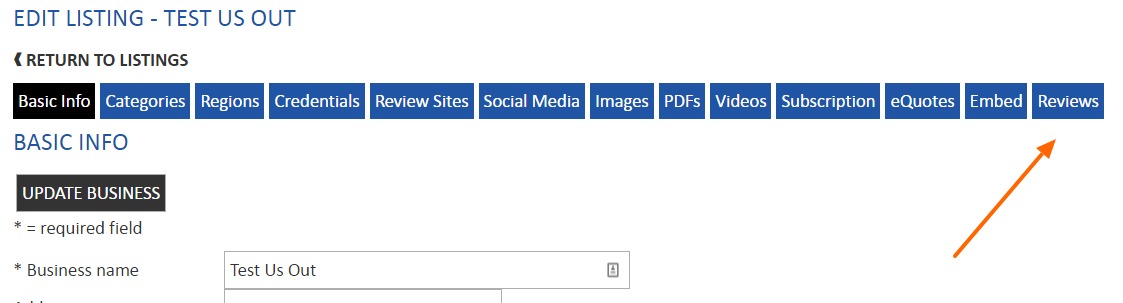
    Step 3 – Go to the Review area of your business

    Step 4 – Process the Review

    Step 5 – See Rejected Review Process

    Step 6 – Adf Have Access to All Remin Stafviews. 

    Step 7 – Customer Can Ask for Deletion of Review at any time.


  • Drain Cleaning

    Drain Cleaning Contractors
    Commercial Residential
    Sewer Inspections Video Camera
    Auger Tree Roots Preventive Maintenance
    Showers Sinks
    Toilets Tubs